Hey there! Let’s cut to the chase—if you’ve ever fumbled with spotty cell service on a camping trip, waited 10 minutes for a text to go through on a hike with your crew, or panicked when your local cell tower went down during a storm, you’ve probably daydreamed about a better way to stay connected. That’s exactly where POC radio (wait, no—POC stands for Push-to-Talk over Cellular, right? I get it, sometimes the acronym trips people up!) saves the day. As someone who’s been in the POC radio game for years—we supply these bad boys, so I’m not just some random blogger ranting—let me break down how you can actually use them for personal communication, no corporate jargon, no confusing tech stuff. Just real stuff that works for your weekend getaways, family road trips, or even when you’re off-grid. POC Radio
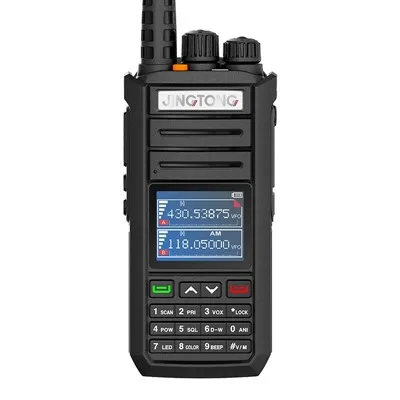
First, let’s get one thing straight: POC isn’t like those old walkie-talkies you picked up at a grocery store. Those ones die after 10 hours, only work half a mile away, and require you to be on the same frequency (which means 12 other random people could be barking into your convo). POC uses cellular networks—like 4G LTE or 5G—so if you have cell service (or even a weak signal that makes regular texts work), your POC radio will work, and you can connect with anyone, anywhere. No range limits, no weird frequency hoops, no random strangers in your chat. That’s a game-changer for personal use, let’s be real. But how do you actually use it for your personal life, not just a construction crew or a big event? Let’s dive into the practical stuff.
Pick the Right Device for Your Personal Needs (Not Our Cheapest One)
I’ve seen so many people grab the first POC radio they see, only to regret it because it’s too big, or too small, or doesn’t have the features they actually want. If you’re using this for personal stuff, you don’t need a $500 rugged brick that’s built for a mining site. Let’s break down the common personal scenarios:
- Weekend Camping & Backcountry Trips: If you’re heading to a national park where cell service is spotty (we’ve all been there—you drive 20 minutes just to get one bar), get a POC radio with a built-in SIM card (no need for a separate phone plan, just a data plan from us or your carrier) and battery life that lasts 3+ days. Also, get one with GPS—trust me, if your kid wanders off on a trail, you can ping their radio and see exactly where they are. No more panicking “where did they go?” moments. We have a slim, water-resistant model that fits in your pocket, not a backpack—perfect for hiking. It even has a flashlight, so you can use it to signal if you’re stuck after dark.
- Family Road Trips: Let’s say you’re crammed in a minivan with 4 kids, and the backseat is a chaos zone. A POC radio for each kid (wait, maybe not every kid, but the oldest ones) means you can send a quick “stop fighting back there” without yelling over the radio or the movies. And if you split up? Like, if one car takes a wrong turn and needs to catch up, you can ping their radio instantly, no need to scramble for cell service in the middle of nowhere. We have a super lightweight model that’s like a big airpod—fits on a lanyard, so teens won’t think it’s uncool. Bonus: it pairs with your phone, so you can also take calls if you need to.
- Small Group Adventures (Friend Hikes, Beach Days): If you’re with 5-6 friends at a state park, a set of mid-range POC radios that work on 5G will keep you connected even if you spread out a mile apart. No more yelling “hey, wait up” across a crowded beach. Also, some of our models let you make private group chats, so you don’t have to deal with random people joining (which used to be a problem with old walkie-talkies). Pro tip: for beach days, get one that’s dust-proof too—sand kills everything, trust me.
The key here is: don’t buy a device that’s overkill. You don’t need a 10-watt radio for a picnic in the backyard. Ask us (we’ll get to that later) if you’re not sure—we don’t push the most expensive one, we push the one that fits your use case.
Set It Up (No Tech Degree Required)
I know what you’re thinking: “Ugh, another device that takes 2 hours to set up.” Nope. POC radios are way easier than they sound. Here’s the step-by-step I walk every personal customer through, and we’ve never had someone get stuck:
- Insert the SIM (or activate the built-in eSIM): Most of our personal models have a built-in eSIM, so there’s no fumbling with tiny SIM cards. Just turn on the radio, follow the 2-second on-screen prompt to connect to our data plan (we offer cheap monthly plans for personal use—way less than a regular phone plan), and you’re done. If you get a model with a physical SIM, it’s like popping in a SIM for your smartwatch—super easy, no tools needed.
- Create your group/contact list: This is the fun part. Once the radio is connected to the cellular network, you can add contacts just like a phone. For personal use, make a group chat for your camping crew, your family, your hiking buddies—whatever. You don’t have to worry about anyone joining unless you send them an invite, so it’s private. Some radios even let you scan a QR code to add a friend’s radio—no typing long numbers, which is perfect when you’re in a hurry at a trailhead.
- Adjust the settings for your situation: Do you want the radio to vibrate when you get a message, or beep loudly? For camping, vibration is better because you don’t want to bother the whole campsite. For a busy beach, loud beeps work. You can also turn on “location sharing” if you need to—so everyone in your group can see where each other is, which is huge for backcountry trips. We have a quick start guide that’s 1 page long, no fine print, so you don’t have to scroll through 50 pages of tech jargon.
Wait, quick note: don’t forget to download the companion app (if your radio has one). It’s free, and lets you do stuff like send photos (perfect for showing your family the cool rock you found on a hike) or check battery life of everyone’s radio. No more guessing if your buddy’s radio is about to die mid-trail.
Use It Like a Pro (For Personal Scenarios That Actually Matter)
Now that you’ve got it set up, let’s talk about real personal uses—no corporate nonsense, just stuff you’ll actually do. I’ve helped customers use these for everything from wedding weekend coordination to emergency situations, so here are my go-to tips:
- Emergency backup when cell service dies: This is the biggest one. Last summer, a customer of mine was camping in Colorado when a thunderstorm knocked out the local cell tower. Everyone’s phones were dead, but his POC radio kept working because it uses a different cellular backup frequency. He was able to ping his buddy who was 2 miles away to get help when his tent got damaged. If you’re heading to a place with iffy service, charge your radio the night before, turn on “low battery mode” (most models have this, it extends battery for 2x as long), and you’ll be covered. Pro tip: keep it in your pocket or a waterproof case, not buried in your backpack.
- Keep an eye on kids without hovering: If you have kids at a crowded amusement park or a fair, give them a small POC radio. Tell them to press the button and say “I’m near the cotton candy stand” if they need you. No more running around panicking when you turn around and they’re gone. We have kid-sized straps so it fits on their wrist, not just their hand, so they can’t drop it.
- Coordinate with other adults on big family events: Got a family reunion at a big park? Split into groups for the BBQ, the games, the photo booth. Make separate group chats for each group—so you can tell the “kids games” group it’s time to eat, and the “adult beer pong” group that the pie is ready, without yelling across the whole park. Way easier than yelling through a megaphone (which we all know is annoying).
- Hike or bike with a larger group without getting separated: If you’re on a hike with 6 people, and someone wants to stop to take photos, they can press the button and say “I’m stopping at the waterfall, catch up” instead of waiting for everyone to turn around. No more checking phones every 2 minutes for texts that don’t go through. And if someone takes a wrong turn, you can ping their GPS and find them fast.
Wait, one thing I get asked all the time: “Do I have to pay for a plan?” For personal use, our monthly plans start at like $10—way cheaper than a regular phone plan, and you only use data when you send a message or a photo (no streaming, so it’s super low data). Some people ask if they can use their existing phone plan, and yes—if you have a mobile hotspot that works, you can connect the radio to that, but our plans are way more reliable for personal use when you’re on the road.
Common Mistakes to Avoid (I See These Every Week)
Let’s be real, even the best tech has quirks. I’ve had customers make these mistakes, so learn from them:
- Not charging the radio before a trip: I know, it’s obvious, but so many people grab the radio, throw it in their bag, and forget to plug it in. If you’re heading out for 3 days, charge it the night before, and if possible, bring a portable charger just in case.
- Buying a radio that’s too big/heavy: If you’re a teen or someone who hates bulky stuff, don’t get a big rugged model. We have slim ones that fit in your jeans pocket—trust me, no one wants to carry a brick on a day hike.
- Not updating the firmware: Just like your phone, these radios get small updates that fix bugs and add new features. Check for updates once a month—takes 10 seconds, and it saves you from weird issues like messages not sending.
- Using the same channel as strangers: Wait, no—modern POC radios don’t work on public channels like old walkie-talkies. But some lower-end models might have group chat settings that let random people join, so make sure your chat is set to “invite-only” so only the people you want can join. That’s a quick setting, I promise.
- Expecting it to work in total dead zones: If you’re in the middle of the backcountry with zero cell service (like, no bars on any phone), it won’t work. But that’s rare—most national parks have at least a 1 bar signal, which is enough for these radios. If you’re going super remote, pair it with a satellite POC radio, but that’s overkill for most personal trips.
When to Reach Out (And Why We’re Different)

Look, I’m not just here to sell you a radio. I’ve been in this game for 8 years, and I’ve helped thousands of people pick the right device for their personal needs. If you’re tired of spotty cell service ruining your trips, if you want a reliable way to stay connected with your family without the hassle of regular phones, hit us up for a chat. We don’t do pushy sales stuff—we’ll ask you how you plan to use the radio, and tell you exactly which model fits, no fluff. No minimum orders, no weird contracts, just honest advice.
References
- Federal Communications Commission. (2022). Push-to-Talk Over Cellular (PoC) Devices: User Guide. Retrieved from industry technical standards for personal communication devices
- National Park Service. (2023). Backcountry Communication Tips for Recreational Hikers. Retrieved from outdoor recreation safety resources
- GSM Association. (2021). Push-to-Talk Over Cellular (PoC) for Consumer Use Cases. Retrieved from mobile communication industry reports
- Consumer Reports. (2022). Walkie-Talkie vs. POC Radios: Which is Better for Personal Use? Retrieved from consumer product testing and advice
4g and Analog Radio Wait, one last thing—seriously, don’t overcomplicate this. POC radio isn’t just for work crews. It’s for a family road trip, a weekend camping, keeping an eye on your kid at a crowded mall. It’s simple, reliable, and way cheaper than dealing with spotty cell service. If you have any questions, just reach out—we’re here to help. No tech jargon, no fine print, just a radio that works for your personal life.
Jingtong (Quanzhou) Electronics Co., Ltd.
We are one of the most professional poc radio manufacturers and suppliers in China, specialized in providing high quality customized service. We warmly welcome you to buy durable poc radio made in China here from our factory. For price consultation, contact us.
Address: No.288, Si Huang Industry Zone, Xia Mei Town, Nan An, Quanzhou, Fujian province, China 362302
E-mail: jtdjj@jtdjj.com
WebSite: https://www.jteradio.com/
