If you’ve spent any time exploring automation solutions for welding—whether you’re a shop foreman tired of inconsistent manual welds, a small business owner weighing the cost of new equipment, or a manufacturing engineer tasked with meeting tight production deadlines—you’ve likely crossed paths with collaborative welding robots (cobots) and the question of what comes included when you buy one. As a supplier who’s worked closely with hundreds of welding operations, I hear this question constantly: Do collaborative welding robots come with their own dedicated welding software? The short answer is yes—but not all software is created equal, and knowing what’s included (and what you might need to add) can make all the difference between a smooth integration and a costly misstep. Collaborative Welding Robot
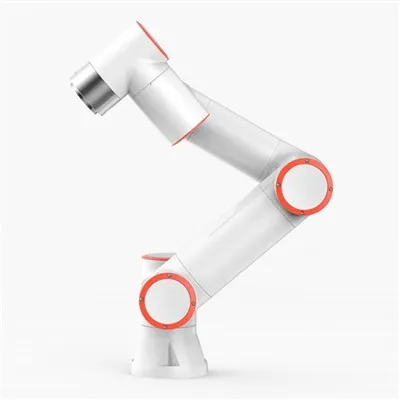
Let’s start with the basics to clear up any confusion. Collaborative welding robots are designed to work alongside human workers, unlike traditional industrial welding robots that require safety cages and operate in isolated cells. Their small footprint, simplified programming, and adaptability make them ideal for job shops, small-to-medium manufacturers, and even fabrication operations that handle low-to-medium volume, high-mix parts. But to perform their core function—welding—they rely on software to control the welding process, not just robotic arm movement. That’s where the line between cobot hardware and its specialized software gets blurrier than a poorly shielded weld.
When a customer first reaches out to me asking about cobot welding systems, most are surprised to learn that nearly every reputable collaborative welding robot system sold today includes native welding software built directly into the cobot’s teach pendant or control interface. This isn’t an afterthought; it’s tailored specifically for welding, which has unique requirements beyond just moving a robot arm from point A to point B. Traditional industrial robots often rely on generic motion control software that requires third-party welding software to integrate with power sources, wire feeders, and other welding peripherals. For cobots, the integration is baked in to cut down on setup time for shops that don’t have dedicated automation engineers.
Let’s break down what that included software typically delivers, because that’s where value lives. First, it offers a user-friendly programming interface specifically for welding, not just robotics. Unlike older industrial robots that required hours of coding or specialized training to teach weld paths, collaborative welding software lets operators “teach” welds simply by moving the robot arm to desired points along a joint, setting parameters like weld speed, amperage, and voltage right on the pendant. For example, if you’re welding a 10-inch steel pipe joint, you can select the weld type (butt, fillet, lap), input the material thickness, and the software automatically adjusts the robot’s path and welding parameters to match. That’s a huge win for small shops where the person running the cobot might be a veteran welder, not a robotics programmer.
Next, the included software handles the critical sync between the cobot and your welding power source. Welding isn’t just about positioning the torch; it’s about delivering precise, consistent electrical current and wire feed to create high-quality welds. The native software eliminates the need for manual calibration between two separate devices (the robot and the welder), which is a common source of errors in poorly integrated systems. It also has built-in safety features tailored to welding: things like arc flash detection, wire feeder speed monitoring, and torch collision sensors that can stop the cobot before it damages the part or the tooling. Since cobots work alongside humans, this welding-specific safety is non-negotiable, and most of it is part of the standard software package.
Another key feature of included collaborative welding robot software is weld quality monitoring. Many people don’t realize that today’s cobot welding software can track real-time data like heat input, wire consumption, and weld penetration, and flag inconsistencies before a weld is completed. For shops that need to meet industry standards (like AWS D1.1 for structural welding), this data can be logged and exported for compliance, which would otherwise require separate quality tracking tools. I recently worked with a job shop that welds custom metal frames for agricultural equipment; before they switched to our cobot system, they had to rework 12-15% of their welds due to inconsistency. With the included software’s quality monitoring, that rework rate dropped to less than 3% in the first month. That’s tangible value from software that comes standard, not an add-on.
But here’s the thing: not all included welding software is the same. Some low-cost cobot models skimp on features, offering only basic motion control and no advanced weld parameter adjustment or quality tracking. I’ve had customers come to me after buying a “cheaper” cobot that came with “welding software” only to find they couldn’t adjust for different material types (like switching from mild steel to aluminum) or couldn’t log weld data for their client’s requirements. That’s why it’s critical to ask, when evaluating a system, what exactly the included software covers, and what might be an extra cost.
For example, our standard collaborative welding system includes software with: pre-built weld libraries for common materials and joint types, teach-by-drag programming, real-time quality monitoring, and basic safety sync with a Miller or Lincoln welding power source. But if a customer needs offline programming (programming the cobot on a computer, away from the production floor, to reduce downtime), that’s an optional add-on. Or if they need specialized features like multi-pass weld support for thick materials or integration with inventory management software to track weld parts, those are also available as premium modules. The key is that the core functionality needed to get up and running with basic welding is included, so you don’t have to pay thousands extra just to make the robot work.
Now, let’s address a common misconception: some shops think that because they already have a welding power source, they don’t need the software that comes with the cobot. But even if your existing welder is top-tier, the software that syncs it to the cobot is essential. Collaborative welding robots are designed to work with specific protocols—like Ethernet/IP or Modbus—to communicate with peripherals, and the included software has the drivers and pre-configured settings for all major welding brands. Trying to work around that by using generic software often leads to compatibility issues, delayed startup, or even damage to the robot or welder. I’ve seen a shop try to save money by skipping the included software and using a third-party tool, and they spent three extra weeks troubleshooting connectivity issues before they called us to fix it. That’s a mistake we want customers to avoid.
Another point to consider: software updates. Reputable collaborative welding robot suppliers include free software updates for a period of time after purchase, which add new weld features, fix compatibility issues with new welding power sources, and improve safety. Some budget suppliers charge for updates, which means your cobot’s software can become outdated quickly, limiting its performance. For example, a few years ago, we released an update to our welding software that added support for aluminum TIG welding, a request from several of our customers in the aerospace parts market. Because it was included at no extra cost, they were able to adapt their cobot to a new job without purchasing a whole new system. That’s a big benefit of buying from a supplier that invests in ongoing software development, not just selling hardware.
So, what does this mean for you, whether you’re a shop owner, production manager, or someone considering a collaborative welding robot? If you’re weighing the cost, start by looking for systems where the core welding software is included. Avoid models that market “bare-bones” robots and force you to buy expensive third-party welding software separately—that’s where the hidden costs add up. The included software should let you perform basic weld programming, sync with your welding power source, and monitor weld quality without extra tools. That said, don’t assume all included software is enough for your specific needs: if you do a lot of high-mix, low-volume work, offline programming might save you more time than it costs. If you need compliance documentation for every weld, look for software that offers easy data export as standard.
As a supplier, I’ve seen too many shops jump into purchasing a collaborative welding robot without asking the right questions about software, and they end up frustrated with their investment. The good news is that for most operations, the software that comes with a quality collaborative welding robot is more than enough to get started, with the option to add advanced features as your business grows. It’s designed specifically to make cobot welding accessible to people who don’t have extensive automation experience, which is exactly why these robots have transformed small and mid-sized manufacturing in the last five years.

If you’re ready to explore how a collaborative welding robot with tailored included software can improve your weld quality, reduce rework, and boost production, we’re here to help. We can walk you through what’s included in our systems, answer questions about software features, and work with you to find the right setup for your specific welding needs. Don’t let uncertainty about software hold you back from making an investment that will pay for itself in better welds, happier operators, and higher productivity. Contact us today to schedule a consultation.
Six-Axis Collaborative Robot References
- International Organization for Standardization (ISO). 2018. Robots and robotic devices — Safety requirements for industrial robots — Part 1: Requirements for industrial robots. ISO 10218-1:2018.
- American Welding Society (AWS). 2022. Specification for Welding Automation Systems. AWS D1.21/D1.21M:2022.
- Robotics Industries Association (RIA). 2021. Collaborative Robot Application Guidelines for Welding. RIA TR R15.606-2021.
- National Institute for Occupational Safety and Health (NIOSH). 2020. Safety and Health Guidelines for Collaborative Robot Welding. NIOSH Publication No. 2020-112.
Xinweilai Intelligent Technology (Shandong) Co., Ltd.
As one of the most professional collaborative welding robot manufacturers and suppliers in China, we’re featured by quality products and good service. Please rest assured to wholesale bulk customized collaborative welding robot from our factory. For pricelist and quotation, contact us now.
Address: Jinghua Road, Economic and Technical Development Zone, Dezhou City, Shandong Province
E-mail: liujiqing@xinweilaiznkj.com
WebSite: https://www.xinweilaiznkj.com/
